
















 Dịch vụ tăng tốc độ website
 Dịch vụ xoá virus mã độc
 Dịch Vụ Thiết Kế Website
 Sửa lỗi và nâng cấp website
 Dịch vụ bảo mật website
 Dịch vụ web hosting
Chia sẻ code css đẹp
Chia sẻ CSS đổi tem giảm giá mặc định Flatsome/WooCommerce sang dạng tag đỏ đẹp hơn
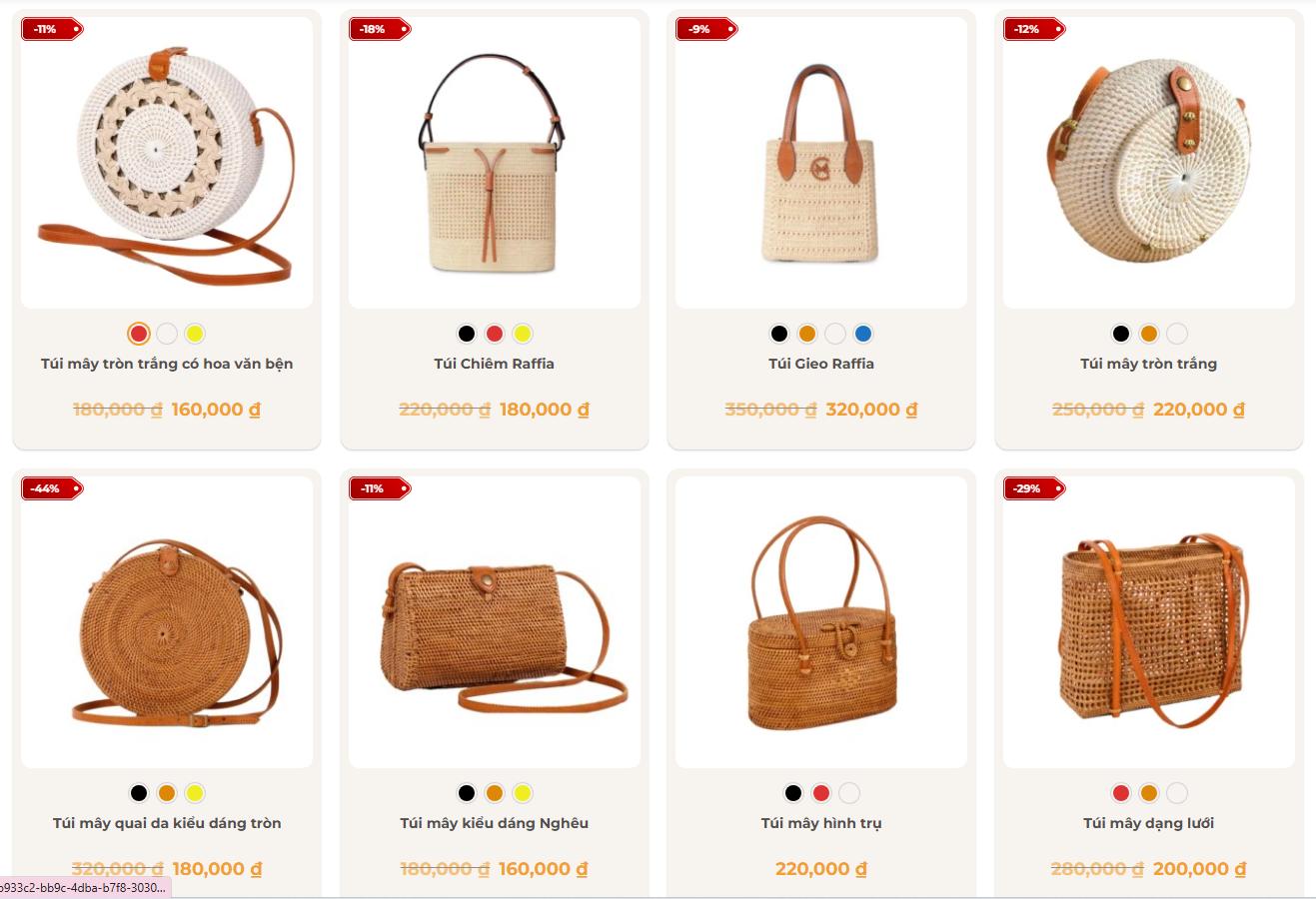
Mặc định theme mới Flatsome thường hiển thị badge giảm giá dạng ô vuông hoặc hình tròn, nhìn hơi đơn giản. Mình vừa chỉnh lại thành dạng tem tag đỏ nhỏ gọn, nhìn chuyên nghiệp hơn và hợp với giao diện bán hàng thủ công, mỹ nghệ, thời trang, decor…
Ưu điểm:
- Tem sale đẹp hơn mặc định
- Canh đúng góc trái sản phẩm
- Chữ phần trăm nằm giữa tem
- Dễ chỉnh vị trí, kích thước
- Dán trực tiếp vào CSS bổ sung là dùng được
Cách dùng:
Vào WordPress → Giao diện → Tùy biến → CSS bổ sung, sau đó dán đoạn CSS này:
.product-small .badge-container,
.product-small .badge-container.absolute.left.top {
    position: absolute !important;
    top: 8px !important;
    left: 8px !important;
    margin: 0 !important;
    z-index: 20 !important;
    width: 63px !important;
    height: 24px !important;
}

.product-small .badge-container .badge {
    width: 63px !important;
    height: 24px !important;
    min-width: 63px !important;
    min-height: 24px !important;
    display: block !important;
    position: relative !important;
    background: url("https://mynghe.giaodien.asia/wp-content/uploads/2026/05/tag-sale.webp") no-repeat center center / 63px 24px !important;
    border-radius: 0 !important;
    box-shadow: none !important;
    overflow: visible !important;
}

.product-small .badge-container .badge-inner {
    position: absolute !important;
    top: 0 !important;
    left: 0 !important;
    width: 55px !important;
    height: 24px !important;
    background: transparent !important;
    color: #ffffff !important;
    font-size: 11px !important;
    font-weight: 700 !important;
    line-height: 24px !important;
    text-align: center !important;
    padding: 0 8px 0 0 !important;
    margin: 0 !important;
    border: none !important;
    box-shadow: none !important;
}
CSS này phù hợp cho Flatsome, WooCommerce và các giao diện sản phẩm có class .product-small, .badge-container, .badge-inner.
Lưu lại để khi cần custom giao diện sản phẩm dùng ngay nhé!