















 Dịch vụ tăng tốc độ website
 Dịch vụ xoá virus mã độc
 Dịch Vụ Thiết Kế Website
 Sửa lỗi và nâng cấp website
 Dịch vụ bảo mật website
 Dịch vụ web hosting
Thủ thuật website
Share code fuction thu gọn mở ra danh mục sản phẩm tối ưu seo
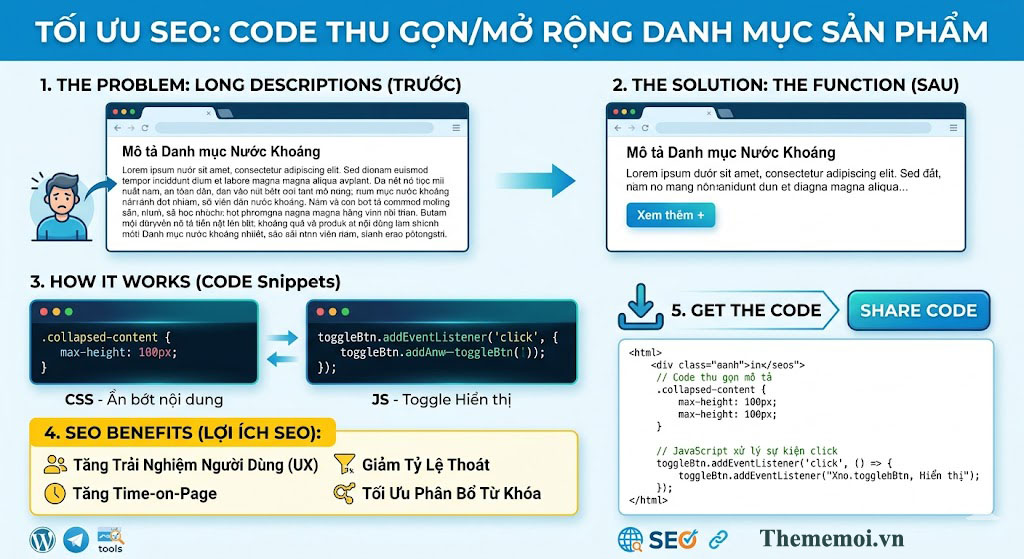
Chào bạn, để tối ưu SEO cho danh mục trên website thememoi.vn, việc dùng code thu gọn/mở rộng (Read More) là cực kỳ chuẩn bài. Nó giúp “giấu” bớt nội dung dài để khách hàng thấy sản phẩm ngay, nhưng Google vẫn đọc được toàn bộ text để xếp hạng.
Nhiều web WooCommerce có danh mục quá dài nhìn rất rối 😵 Hom nay admin theme mới share đoạn code thu gọn danh mục sản phẩm có thể:
✅ Click để xổ danh mục con
✅ Click lại để thu gọn
✅ Có dấu “+” đẹp mắt
✅ Nhẹ, không cần plugin
✅ Tương thích widget danh mục WooCommerce
📌 Chỉ cần thêm vào functions.php hoặc dùng plugin Code Snippets.
/* Thu gọn mô tả danh mục sản phẩm WooCommerce */
add_action('wp_footer', function () {

    if (!is_product_category()) return;

?>
<style>
.cat-desc-wrap{
    position:relative;
    margin-bottom:30px;
}

/* Nội dung */
.cat-desc-content{
    position:relative;
    max-height:115px;
    overflow:hidden;
    transition:max-height .45s ease;
}

.cat-desc-content.active{
    max-height:3500px;
}

/* Hiệu ứng fade */
.cat-desc-content:after{
    content:"";
    position:absolute;
    left:0;
    bottom:0;
    width:100%;
    height:70px;
    background:linear-gradient(to bottom, rgba(255,255,255,0), #fff);
    transition:opacity .3s ease;
    pointer-events:none;
}

.cat-desc-content.active:after{
    opacity:0;
}

/* Nút xem thêm */
.cat-toggle{
    display:flex;
    align-items:center;
    justify-content:center;
    gap:6px;

    width:fit-content;
    margin:20px auto 0;
    padding:11px 22px;

    background:linear-gradient(180deg,#18b4ff,#0097e6);
    color:#fff;

    font-size:15px;
    font-weight:700;

    border-radius:10px;
    cursor:pointer;

    box-shadow:0 6px 18px rgba(0,151,230,.28);

    transition:all .25s ease;
}

/* icon */
.cat-toggle:before{
    content:"+";
    font-size:16px;
    font-weight:700;
    line-height:1;
}

/* hover */
.cat-toggle:hover{
    transform:translateY(-2px);
    box-shadow:0 10px 22px rgba(0,151,230,.35);
}

/* khi mở */
.cat-desc-content.active + .cat-toggle:before{
    content:"−";
}
</style>

<script>
document.addEventListener("DOMContentLoaded", function(){

    let desc = document.querySelector('.term-description');

    if(desc){

        // tránh load trùng
        if(desc.querySelector('.cat-desc-wrap')) return;

        let oldContent = desc.innerHTML;

        desc.innerHTML = `
            <div class="cat-desc-wrap">
                <div class="cat-desc-content">${oldContent}</div>
                <div class="cat-toggle">
                    <span class="toggle-text">Xem thêm</span>
                </div>
            </div>
        `;

        const content = desc.querySelector('.cat-desc-content');
        const button = desc.querySelector('.cat-toggle');
        const text = desc.querySelector('.toggle-text');

        button.addEventListener('click', function(){

            content.classList.toggle('active');

            if(content.classList.contains('active')){
                text.innerHTML = 'Thu gọn';
            } else {
                text.innerHTML = 'Xem thêm';
            }

        });

    }

});
</script>
<?php

});
sau khi thêm code này nó sẽ:
- Có dấu
+để mở - Click sẽ xổ danh mục con
- Click lại sẽ thu gọn lại
- Không ảnh hưởng menu khác
💡 Ai cần mình share thêm:
-
CSS đẹp hơn
-
Icon mũi tên xoay
-
Tự mở category hiện tại
-
Animation mượt hơn
-
Style tone vàng cam premium
thì comment nha 😁